Why Doesn't My Claude Code Plugin Load in a Cloud Session?
The install worked in my test cloud session only because it had the plugin’s private repository attached. Sessions without it failed silently.

On this page
TL;DR
Claude Code cloud sessions don’t install the plugins a repository’s .claude/settings.json turns on, and their GitHub proxy only serves the repositories attached to the session. So a plugin from a private marketplace doesn’t load there. Its skill still can. Zip the skill folder, upload it under Customize > Skills on claude.ai, and turn it on. In a new cloud session with nothing attached, it showed up as anthropic-skills:<skill>. The trade-offs: you upload again for every release, and the skill loads in every session on your account. A missing skill doesn’t raise an error. Claude still answers, but without the skill’s process, so ask the session to list its skills.
I was working on a project spread across several private repositories, and I created a skill I wanted to share between them as a Claude Code plugin. My plan was a private GitHub repository that’s both the plugin and its marketplace, so the skill stays in sync on my laptop and in cloud sessions. Most of my work happens in Claude Code on the web, because I like that it keeps the work off my laptop, runs in isolation, and is there on my phone. I tested the install commands by hand in a cloud session, then put them in the environment’s setup script, and the test worked. In the next real session the skill never loaded, and I got no error, not even a small one. Here’s how I tracked down the cause, what I tried that didn’t work, and the two workarounds that did.
Skill doesn’t load in a cloud session, and there’s no error
The session starts normally. You paste the notes the skill is built for, and Claude gives a reasonable, generic answer instead of following the skill.
That’s what makes it easy to miss. When a skill doesn’t load, Claude still answers, and nothing hints that a skill should have run. The only clue I had was that the answer was good but didn’t follow the skill’s steps.
My test had passed only because of how that session was set up. The session I tested in had the skills repository attached as one of its sources. The real sessions had only the repository I was working in. I also never confirmed that the saved setup script still had the install commands in it. Its log only showed output from another installer.
A second session found the cause. I messaged the failing session from the one where I built the plugin and asked it to inspect its own environment: the plugin list, the contents of ~/.claude, and the settings files. It reported that no marketplace had ever been added.
Cloud session can’t reach a private repository that isn’t attached
A cloud session reaches GitHub through a proxy, and the cloud environments documentation (opens in a new tab) says it serves GitHub API requests only for the repositories attached to the session. Git behaved the same way for me. In a fresh session with only the consuming repository attached, I tried to reach the skills repository:
$ git ls-remote https://github.com/<owner>/<skills-repo>.gitOutput
fatal: could not read Username for 'https://github.com': terminal prompts disabledNo credentials were supplied for it, so git asked for a username and gave up, even though the Claude GitHub App had access to that repository on my account. I didn’t run the same command against the attached repository to compare. The same session hit the limit again, this time with nothing to do with plugins: npm ci couldn’t fetch the project’s private SDK, which lives in another private repository that wasn’t attached.
Here’s what that means for each way of installing the plugin:
- Repository settings: The documentation (opens in a new tab) lists plugins and marketplaces declared in a repo’s
.claude/settings.jsonas not available in cloud sessions. I never put the plugin there, so this is what the docs say, not something I tested. - Setup-script install: I never confirmed my install commands ran, and the log was empty. If the script can only reach attached repositories, like the session, it had nothing to fetch. I haven’t tested that.
- Plugin installed mid-session: In one session, installing from an attached copy left the plugin enabled but not loaded, and the cloud UI has
/reload-skillsbut no/reload-plugins. In an earlier session the same install did make the skill appear. I don’t know what was different.
Plugin added on claude.ai never reaches the session
Your claude.ai account has a plugins page too. Under Customize > Plugins > Add > Add marketplace > Add from a repository, claude.ai takes a private GitHub repository once the Claude GitHub App can read it. The plugins overview (opens in a new tab) says a plugin you add there downloads to Claude Code as a synced plugin, which the plugin loading reference (opens in a new tab) names <name>@synced. That reference says synced plugins load in Cowork and in signed-in terminal sessions. It doesn’t mention cloud sessions, although mine did get Anthropic’s synced plugins.
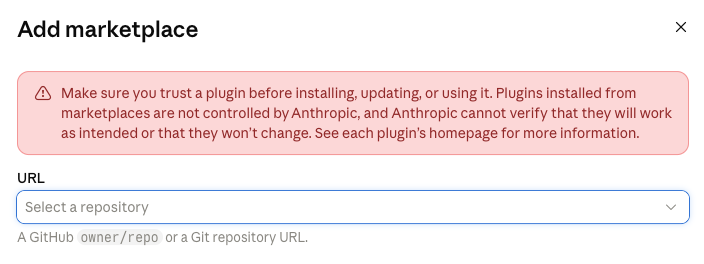
The marketplace synced and the plugin showed as added, with no error. In the ten minutes I watched, it never showed up anywhere:
- Cloud session, started five minutes after the add: The synced manifest under
~/.claude/plugins/synced/listed 10 plugins, all from Anthropic’sknowledge-work-pluginsmarketplace. Mine wasn’t there. - Terminal on my Mac, started ten minutes after the add: It printed
Plugins changed. Run /reload-plugins to activate., and the rewritten manifest listed 4 plugins from the same Anthropic marketplace. Mine wasn’t there either. claude plugin marketplace list: ItsFrom claude.ai:section listed only My Uploads and the Anthropic Directory.
One caveat: my Mac already had the same plugin installed from the command line, which may have affected that result. The cloud session had no local copy, so its result is clean. Add > Upload plugin is a second way to put a plugin on your account. I didn’t try it.
An open issue, anthropics/claude-code#92031 (opens in a new tab), describes the same thing from another account: plugins installed on claude.ai never reach cloud sessions, while skills enabled on the account do. That’s the route in the next section.
Upload the skill to your claude.ai account
A skill doesn’t need to be a plugin to reach a cloud session. The skills documentation (opens in a new tab) says cloud sessions load the skills enabled for your claude.ai account, synced at session start.
On your machine, zip the skill folder, with its
SKILL.mdinside the folder. To build the zip from a release tag in the skills repository, run:Command$ git archive --format=zip --prefix=<skill>/ -o <skill>.zip \ <tag>:plugins/<plugin>/skills/<skill>On claude.ai, go to Customize > Skills > Add > Upload skill, upload the zip, and turn the skill on.
Start a new cloud session, and ask Claude to list its skills.
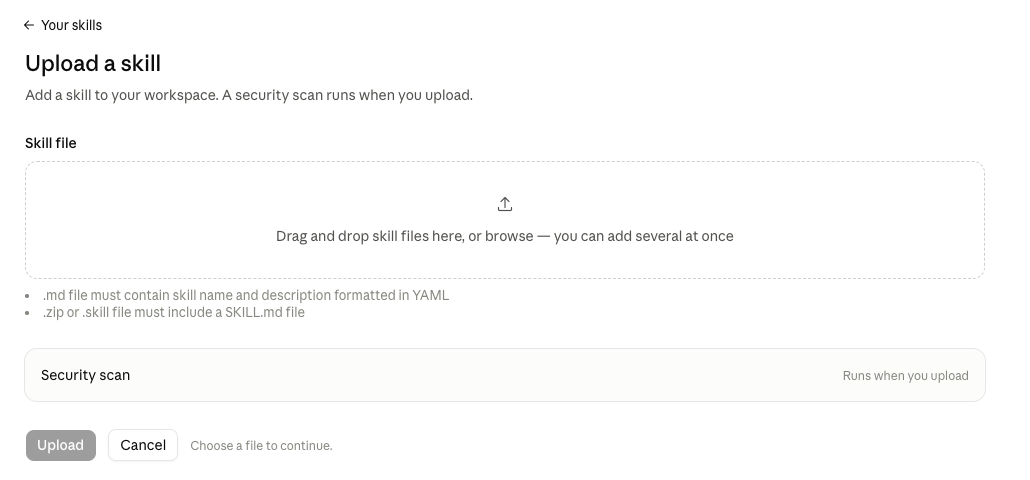
On upload, claude.ai previews the skill’s name and description and runs a security scan. In a new cloud session with only the consuming repository attached, the skill showed up as anthropic-skills:<skill>. I checked that in one session. My test of Claude actually using the skill, in the section on confirming it loaded, ran on the copied version from the next section, which has the same files.
There are two costs. claude.ai numbers the skill’s versions v1, v2 and so on, not by your git tags, and each release means another upload. It’s an account skill, so it loads in every session on the account, not only the repositories that use it. That includes terminal sessions: on my Mac it appeared beside the same skill from the installed plugin, so the session offered it twice. Uninstall the local plugin, or turn the account skill off, to keep one.
Copy the skill into the cloud session
If a session needs a specific release, copy the skill in from the skills repository instead. The skills documentation (opens in a new tab) says Claude Code watches ~/.claude/skills/ and picks up a skill added there during the session, without a restart.
Start the cloud session with two repositories attached: the one you’re working in and the skills repository.
Ask Claude where the skills repository was cloned. It was
/home/user/<skills-repo>in my sessions.Ask Claude to copy the skill folder into your user skills directory, changing nothing else:
Command$ mkdir -p ~/.claude/skills $ cp -R /home/user/<skills-repo>/plugins/<plugin>/skills/<skill> \ ~/.claude/skills/<skill>Ask Claude to list its skills. If
~/.claude/skills/didn’t exist when the session started, run/reload-skillsfirst, because Claude Code wasn’t watching it.

The skill loads as plain <skill>, with no prefix. To copy a specific release, run git -C /home/user/<skills-repo> fetch --tags and git -C /home/user/<skills-repo> checkout <tag> before the copy. I haven’t tested that step. The copy doesn’t carry over to other sessions.
If every session in a repository needs the skill, commit a copy under that repository’s .claude/skills/ instead. The documentation lists the repository’s own skills as available in cloud sessions. The cost is a copy in every repository, which is what the plugin was meant to avoid. I built it once, checked it against the release tag, and didn’t merge it.
Both routes bring over the plugin’s skills only. Hooks, agents and MCP servers in the plugin don’t load this way, and I haven’t found a way to load them in a cloud session without /reload-plugins.
Confirm the skill loaded
There are two checks. The session’s skill list shows the skill loaded. Asking a question the skill is built for, without naming the skill, shows that Claude actually uses it. My first test was a request to look over a project and say where it could be better. The session announced the skill’s first step and worked through its process. If the answer is generic, ask which skill it used.
For the skill list, ask Claude to list its skills, and look for <skill> or anthropic-skills:<skill>.
A plugin that shows as enabled in claude plugin list isn’t proof. In one of my sessions it was enabled and never loaded. A folder in ~/.claude/skills/ isn’t proof either, until the session lists it.
Do this with a coding agent
What found my cause was an agent inspecting its own environment. Paste this into the coding agent in the cloud session you want to check. Run it once in a session where the skill works and once where it doesn’t, then compare the two reports. Replace the placeholders first.
Inspect your own environment, read-only, and report whether a skill is available and where it came from. Change nothing: do not install, enable, disable, add, remove, copy, or edit anything, and do not print any token, key, or password you come across.

Skill name: <skill-name>
Plugin name: <plugin-name>
Skills repository: <owner>/<skills-repo>

1. Print the Claude Code version.
2. List the installed plugins with their version, scope, and status. Note which ones are <name>@synced.
3. List the plugin marketplaces that have been added.
4. List ~/.claude/skills/ and ~/.claude/plugins/, including plugins/synced/.
5. List the repositories attached to this session, and say whether the skills repository is one of them.
6. Run git ls-remote https://github.com/<owner>/<skills-repo>.git and quote any error verbatim.
7. Report whether this repository's .claude/settings.json has enabledPlugins or extraKnownMarketplaces entries.
8. Report whether a setup script log exists for this session and whether it contains output from a plugin install.
9. List the skills available to this session, and say whether <skill-name> is among them and under what name.

Then answer in this form:
- Skill <skill-name> available: yes or no, and under what name
- Plugin <plugin-name> installed: yes or no, and whether it is loaded or only enabled
- Synced plugins: the names, or none
- Skills repository attached: yes or no
- Skills repository reachable with git: yes, or the error
- Plugin settings in the repository: the entries, or none
- Setup script install output: found, not found, or no log
- Anything you could not check, and why
Common failures
Git fails with terminal prompts disabled
Error
fatal: could not read Username for 'https://github.com': terminal prompts disabledIn a Claude Code cloud session, git prints this for a private repository that isn’t attached to the session, because the GitHub proxy supplies no credentials for it. A mistyped repository name probably produces the same prompt. Check the name, then attach the repository or start a session with it attached. The documentation describes the proxy’s answer to a GitHub API request for an unattached repository as a 403 whose message starts GitHub access to and contains is not enabled for this session.
Setup-script install leaves no trace
First check that the saved setup script still contains the install commands. Mine was never checked. If it does, a private skills repository that isn’t attached is a likely cause. The documentation (opens in a new tab) also says later sessions can start from a cached snapshot and skip the setup script, so a missing log line doesn’t prove the script failed. Check the session itself with claude plugin list.
enabledPlugins in .claude/settings.json does nothing in a cloud session
A cloud session doesn’t install the plugins a repository turns on under enabledPlugins. The plugin loading reference (opens in a new tab) says it doesn’t add the marketplaces under extraKnownMarketplaces either, because that needs the workspace trust dialog, which a cloud session never shows. Those keys still work for local sessions. The open issue anthropics/claude-code#78119 (opens in a new tab) tracks this, and a comment there reports that plugins declared in organization-managed settings don’t install in cloud sessions either. I can’t test that on an individual account.
Plugin is enabled but the skill isn’t listed
A plugin installed after the session starts loads only when Claude Code restarts or runs /reload-plugins, and the cloud UI has no /reload-plugins. Upload the skill to your claude.ai account, or copy it into ~/.claude/skills/.
Install worked in a test session and fails in the real one
What’s attached to a session decides what it can reach. Test in a session set up like the one that will use the skill, with the same repositories attached and nothing more.
Still open: a way to load a whole private plugin, with its hooks, agents and MCP servers, into a cloud session without attaching its repository. Its skills have a route. I haven’t found one for the rest. If you’ve found a way that works, I’d like to hear about it. Reply to any newsletter issue.
Tested with
- Claude Code
- 2.1.302
- Account
- individual claude.ai plan
- Cloud session
- claude.ai/code
- Terminal
- macOS, signed in with a claude.ai account
- Date
- October 2026