Cut Multi-Camera Dashcam Clips with ffmpeg Without Re-Encoding, and Keep Them in Sync
Stream-copy each dashcam camera and line the files up to the frame, even though each camera’s keyframes fall at their own drifting fraction of a second.

On this page
TL;DR
Cut each camera with one pass of ffmpeg’s concat demuxer over its source
segments, with -c copy. In the listing, set the first inpoint to that
camera’s own keyframe at or before the moment you want, not to the moment
itself:
file '<drive-folder>/07_16_26_120000_sideLeft_002.mp4'
inpoint 889.966667
outpoint 900
file '<drive-folder>/07_16_26_120000_sideLeft_003.mp4'
inpoint 0
outpoint 30$ ffmpeg -f concat -safe 0 -i sideLeft.txt -c copy sideLeft.mp4Snapping makes an offset camera’s file start a few frames early. Confirm that
every file has a start_time of 0 and the same number of frames plus that
lead. In DaVinci Resolve, set each clip’s In point that many frames in, then
build the multicam with the angles synced by In point.
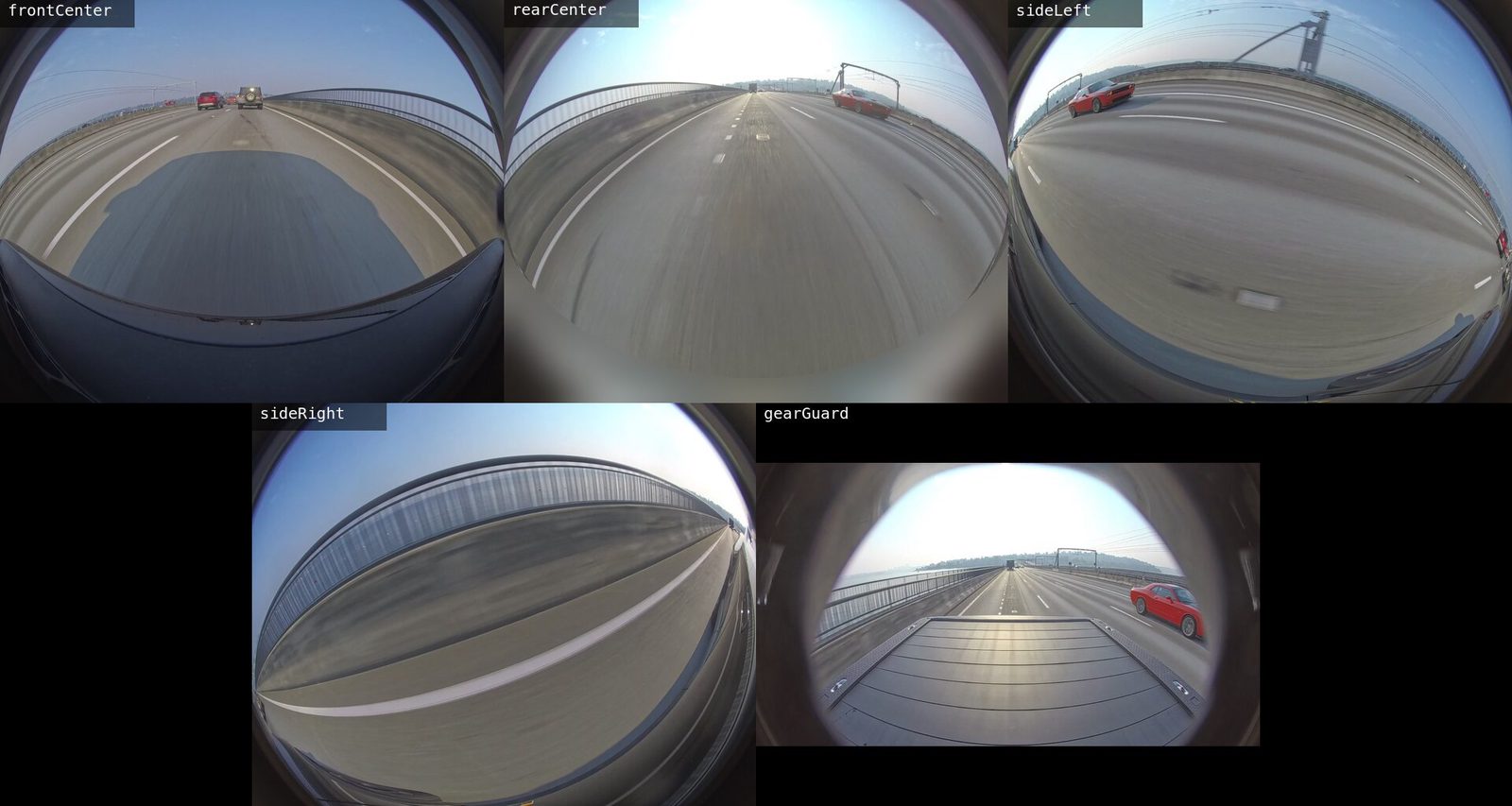
I wanted the same few minutes of a drive, the crossing of the I-90 floating bridge, from all five cameras of a Rivian R1T, as five files for a multicam edit. Re-encoding five streams to get exact cuts costs time and picture quality, so the cut is a stream copy. A stream copy is exact only where the source allows it. My first three attempts came out of sync, and each failure is the reason for one step in the procedure.
How the truck records
The truck writes one folder per drive, named MM_DD_YY_HHMMSS in local time.
It holds one file per camera per 15-minute segment,
<drive>_<camera>_<NNN>.mp4, and every segment except the last runs 900 s.
The cameras are frontCenter, rearCenter, sideLeft, sideRight,
and gearGuard.
Three properties of the files decide how they can be cut and synced:
- The video is H.264 at 30 fps, with I-frames and P-frames only and one keyframe per second.
- The files have no audio track and no timecode track.
- All five cameras of a segment have the same 900 s duration; their
creation_timecan differ by a couple of seconds, so it can’t sync them.
With no audio and no timecode, an editor has nothing to sync the angles on but each file’s first frame. The cut has to start every camera on a known frame, so the edit can line the first frames up.
Why stream-copied cameras drift
A stream copy can’t start a file on a P-frame, because a P-frame is stored as a difference from earlier frames that the new file won’t contain. It starts on a keyframe. Two details of this footage turn that rule into drift:
- Keyframes don’t fall at the same instant on every camera. On most cameras they fall on whole seconds. On some drives, one or more cameras put them 0.967 s after each second, one frame before the next whole second.
- Some cameras’ groups of pictures run across segment files. A segment can open with frames that come before its first keyframe. Those frames reference frames at the end of the previous file.
Each attempt that failed ran into one of these, and the checks in the last step of the procedure catch each one:
| Cut | What came out | Step that prevents it |
|---|---|---|
| Each segment cut separately, then joined | The offset camera 1.9 s short, from a late start and frames lost at the join; the timestamps run on without a gap | Write one concat listing per camera |
| One concat pass, the same in-point for every camera | The offset camera starts at its next keyframe, short by the frames before it | Snap the in-point to the camera’s own keyframe |
| An in-point that lands after the keyframe | The file carries a start_time of 0.967 s instead of 0 | Snap the in-point to the camera’s own keyframe |
Equal durations aren’t enough. Two files can be the same length and still
start at different moments, so the checks look at frame counts and at
start_time together.
Find the segments the window touches
Express the window in seconds from the start of the drive. Segment NNN covers
drive seconds (NNN − 1) × 900 to NNN × 900. The examples here use a window
chosen to straddle a join, because that’s where a cut goes wrong: from 1790 to
1830 s, it touches two segments:
| Segment | inpoint before snapping | outpoint |
|---|---|---|
002 | 890 | 900 |
003 | 0 | 30 |
Every segment after the first starts at inpoint 0, and every segment before
the last ends at outpoint 900. Only the first segment’s in-point is snapped.
Find each camera’s keyframe at the in-point
Each camera writes a keyframe about once a second, but not at the same fraction of a second as the others, and not always at the same fraction for a whole segment. On one drive, the Gear Guard camera’s keyframes start on whole seconds and slip to whole seconds plus 0.933 by the end of the segment:
$ ffprobe -v error -select_streams v -skip_frame nokey \
>   -show_entries frame=pts_time -of csv=p=0 -read_intervals %+3 \
>   08_02_26_120000_gearGuard_001.mp4
Output
0.000000
1.000000
1.966667
2.966667$ ffprobe -v error -select_streams v -skip_frame nokey \
> -show_entries frame=pts_time -of csv=p=0 -read_intervals 887%+3.001 \
> 08_02_26_120000_gearGuard_001.mp4Output
887.933333
888.933333
889.933333
Across the drives I checked, keyframes sat on whole seconds or at whole seconds plus anything from 0.733 to 0.967, and most cameras that weren’t on whole seconds drifted within a segment. Which camera is offset, and by how much, changes from drive to drive. Test your own footage rather than assuming any of these numbers: list the keyframes in the 3 seconds before the in-point, in the segment that contains it, for every camera.
Snap the in-point to the camera’s own keyframe
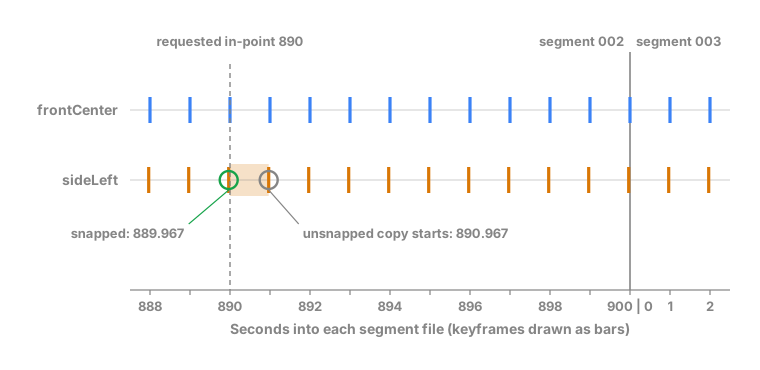
For each camera, move the first in-point back to the latest keyframe at or before it, from the listing near the in-point. On the drive above, 890 becomes 889.933333 for the Gear Guard camera and stays 890 for the others. Measuring the offset at the start of the segment and applying it at 890 would give 889.966667, which is after the real keyframe.
Snap in drive time, not segment time. When the in-point falls before the first keyframe of its segment, start on the last keyframe of the previous segment, because the first frames of a segment reference the tail of the one before it. Only at the start of a drive, with nothing before it, does such an in-point become 0.
Rounding back rather than forward is the point. On the drive these examples
come from, a stream copy given 890 on the offset side-left camera started at
its next keyframe, 890.967, so the file opened 0.967 s late and carried that
as its start_time. Given 889.966667, its keyframe there, it started on the
keyframe exactly, at time 0. The snapped camera’s first frames come before
the other cameras’ first frame, by the gap between its keyframe and the
in-point: 1 frame at 0.967, 8 frames at 0.733. A stream copy can’t remove
them, so the edit does: set that clip’s In point that many frames in.
Write one concat listing per camera
Write a listing for each camera with one file, inpoint, and outpoint entry
per segment. <drive-folder> stands for the drive folder’s absolute path, which
is why the cut later needs -safe 0:
file '<drive-folder>/07_16_26_120000_sideLeft_002.mp4'
inpoint 889.966667
outpoint 900
file '<drive-folder>/07_16_26_120000_sideLeft_003.mp4'
inpoint 0
outpoint 30
One listing for both segments is what keeps the frames after the join. The
concat demuxer reads segment 003 straight after the tail of 002, so the
frames at the start of 003 that reference 002 still have their reference.
Cutting 003 on its own drops them, and joining the two pieces afterwards
can’t bring them back.
Cut each camera with a stream copy
Run the concat demuxer once per camera. This writes a new file and leaves the source segments untouched:
$ ffmpeg -f concat -safe 0 -i 07_16_26_120000_sideLeft.txt \
>   -c copy 07_16_26_120000_sideLeft.mp4
The following script does the last four steps for all five cameras. It takes the drive folder, the window’s start and end in drive seconds, and an output folder, and writes each camera’s listing and clip there:
#!/bin/bash
set -euo pipefail
folder=$(cd "$1" && pwd) start=$2 end=$3 out=$4
drive=$(basename "$folder")
segment_seconds=900
mkdir -p "$out"

# Stop with the camera and the file named, rather than ffprobe's bare error.
require() {
  if [[ ! -f $1 ]]; then
    echo "$camera: no file $(basename "$1")" >&2
    exit 1
  fi
}

# Print the latest keyframe at or before $3 seconds into file $1, looking back
# $2 seconds; print nothing if there is none in that span.
keyframe_at_or_before() {
  local file=$1 back=$2 at=$3 from
  from=$(awk -v a="$at" -v b="$back" 'BEGIN { f = a - b; if (f < 0) f = 0; print f }')
  ffprobe -v error -select_streams v -skip_frame nokey \
    -show_entries frame=pts_time -of csv=p=0 \
    -read_intervals "${from}%$(awk -v a="$at" 'BEGIN { print a + 0.001 }')" "$file" |
    cut -d, -f1 | awk -v a="$at" -v f="$from" \
      '$1 >= f - 0.0005 && $1 <= a + 0.0005 { k = $1 } END { if (k != "") print k }'
}

for camera in frontCenter rearCenter sideLeft sideRight gearGuard; do
  segment=$(( start / segment_seconds + 1 ))
  local_in=$(( start - (segment - 1) * segment_seconds ))
  file="$folder/${drive}_${camera}_$(printf '%03d' "$segment").mp4"
  require "$file"
  length=$(ffprobe -v error -show_entries format=duration -of csv=p=0 "$file")
  if awk -v l="$length" -v i="$local_in" 'BEGIN { exit !(l <= i) }'; then
    echo "$camera: $(basename "$file") ends before ${local_in}s" >&2
    exit 1
  fi
  keyframe=$(keyframe_at_or_before "$file" 3 "$local_in")
  if [[ -n $keyframe ]]; then
    snapped=$(awk -v k="$keyframe" -v b=$(( (segment - 1) * segment_seconds )) \
      'BEGIN { printf "%.6f", b + k }')
  elif (( local_in >= 3 )); then
    # No keyframe this far into the segment means the file ends before it.
    echo "$camera: $(basename "$file") ends before ${local_in}s" >&2
    exit 1
  elif (( segment > 1 )); then
    # The in-point falls before this segment's first keyframe, so the frames
    # there depend on the previous segment: start on its last keyframe.
    previous="$folder/${drive}_${camera}_$(printf '%03d' $(( segment - 1 ))).mp4"
    require "$previous"
    keyframe=$(keyframe_at_or_before "$previous" 3 "$segment_seconds")
    if [[ -z $keyframe ]]; then
      echo "$camera: segment $(( segment - 1 )) ends early" >&2
      exit 1
    fi
    snapped=$(awk -v k="$keyframe" -v b=$(( (segment - 2) * segment_seconds )) \
      'BEGIN { printf "%.6f", b + k }')
  else
    snapped=0
  fi
  echo "$camera starts $(awk -v s="$snapped" -v a="$start" \
    'BEGIN { printf "%d", (a - s) * 30 + 0.5 }') frames early"
  first=$(awk -v s="$snapped" -v n="$segment_seconds" 'BEGIN { print int(s / n) + 1 }')
  last=$(( (end - 1) / segment_seconds + 1 ))
  listing="$out/${drive}_${camera}.txt"
  : > "$listing"
  for (( segment = first; segment <= last; segment++ )); do
    source="$folder/${drive}_${camera}_$(printf '%03d' "$segment").mp4"
    require "$source"
    segment_start=$(( (segment - 1) * segment_seconds ))
    clip_in=0
    (( segment == first )) && clip_in=$(awk -v s="$snapped" \
      -v b="$segment_start" 'BEGIN { printf "%.6f", s - b }')
    clip_out=$(( end - segment_start ))
    (( clip_out > segment_seconds )) && clip_out=$segment_seconds
    length=$(ffprobe -v error -show_entries format=duration -of csv=p=0 "$source")
    if awk -v l="$length" -v o="$clip_out" 'BEGIN { exit !(l < o - 0.05) }'; then
      echo "$camera: $(basename "$source") ends before ${clip_out}s" >&2
      exit 1
    fi
    printf "file '%s'\ninpoint %s\noutpoint %s\n" \
      "$source" "$clip_in" "$clip_out" >> "$listing"
  done
  ffmpeg -nostdin -v error -f concat -safe 0 -i "$listing" \
    -c copy "$out/${drive}_${camera}.mp4"
done$ bash cut-window.sh <drive-folder> 1790 1830 cutsFor each camera, the script prints how many frames before the window’s start its file begins: 0 for a camera with a keyframe on the start, more for an offset one. Keep that list for the edit.
If a camera has no file for a segment the window touches, or its file ends before the window does, the script stops and names the camera and the file rather than writing a short clip. The camera usually restarted into a sibling folder partway through the drive.
Verify the start and frame count of every camera
In the output folder, print each file’s start_time, the number of frames that
decode, and the number of packets in the file:
$ for clip in *.mp4; do
>   printf '%s ' "$clip"
>   ffprobe -v error -select_streams v -count_frames -count_packets \
>     -show_entries stream=start_time,nb_read_frames,nb_read_packets \
>     -of csv=p=0 "$clip"
> done
Output
07_16_26_120000_frontCenter.mp4 0.000000,1200,1200
07_16_26_120000_gearGuard.mp4 0.000000,1200,1200
07_16_26_120000_rearCenter.mp4 0.000000,1201,1201
07_16_26_120000_sideLeft.mp4 0.000000,1201,1201
07_16_26_120000_sideRight.mp4 0.000000,1200,1200
The cut is good when all three hold:
- Start
- Every file’s
start_time, the first column, is0.000000. - Length
- The frame counts differ only by each camera’s lead, the frames the script reported it starts early.
- Join
- The decoded frames equal the packets on every file, so every frame after the segment join decoded.
The third check is the one that sees the join. -count_frames decodes the
whole file and counts only the frames that decoded; a frame whose reference is
missing is dropped without an error. The same command on the source segment
003 on its own, outside the concat pass, shows the frames that depend on
002:
$ ffprobe -v error -select_streams v -count_frames -count_packets \
>   -show_entries stream=nb_read_frames,nb_read_packets -of csv=p=0 \
>   07_16_26_120000_sideLeft_003.mp4
Output
26971,27000Those 29 frames are the ones a per-segment cut loses. Decoding with
ffmpeg -v error … -f null - prints nothing for them, so a silent decode is not
evidence of a clean join. Compare the counts.
Build the multicam clip
In DaVinci Resolve, the leads the script printed are the only alignment the five files need:
- Import the five files into the Media Pool.
- For each camera with a lead, open its file in the source viewer, step forward that many frames from the first, and mark an In point.
- Select all five, right-click, and choose Create New Multicam Clip Using Selected Clips.
- Set Angle Sync to In.
- Create the multicam clip, and put it on a timeline.
- Switch the Edit page’s source viewer to Multicam and cut between angles during playback.
In lines up each file’s In point, which is its first frame unless you
mark one. The other sync methods need something
these files don’t carry: Timecode needs a timecode track and Sound
needs audio. A file whose first frame is 0.967 s later than the others’ is
0.967 s out of sync after an In-point sync, whatever its start_time says.
That’s why the verification step checks the start before the files reach
Resolve.
Check each clip for a location before you share it
The concat demuxer drops the truck’s GPS fix, but other ways of cutting keep it; Read the GPS location from Rivian dashcam video with ffprobe covers which. Check the file you’re about to share:
$ exiftool -G1 -a "-gps*" "-location*" 07_16_26_120000_sideLeft.mp4Empty output means no location field was found.
Tested with
- ffmpeg
- 9.0.1, 9.0.2
- macOS
- 27.0
- Footage
- Rivian dashcam, five cameras, 900 s segments
- Date
- October 2026