Rivian Dashcam Camera Missing from a Drive: It Restarted in Another Folder
A Rivian R1T camera that stops partway through a drive often restarted into a sibling folder; motion correlation, not folder names, gives its offset.
On this page
TL;DR
The camera didn’t stop recording. It restarted seconds later into a new drive folder that holds only the restarted cameras. Look for a folder named a few seconds after the broken one, with fewer than five cameras in it.
Don’t take the offset from the two folder names. Measure it by correlating the motion of two cameras that face the same way, such as the Gear Guard camera and the rear camera. Then re-encode the restarted cameras from the sibling folder at that offset, so that they start on the exact frame.
I cut a five-camera clip from a drive on August 7 and dropped it into a multicam timeline. Three angles played to the end. The rear camera and the side-left camera went black after 33 seconds. Every file was readable and nothing reported an error. The footage I thought was lost was in the next folder.
Rear or side camera stopped recording after a few seconds
The symptom has a few forms, depending on what you build from the drive:
- A camera’s only file in the drive folder is a few seconds long, while the other cameras have a full set of 15-minute segments.
- A multicam clip or a grid of the five cameras shows black tiles for one or two angles for most of the drive.
- A hyperlapse of one angle is much shorter than the others, or ends in black.
On the August 7 drive, the folder 08_07_26_140000 holds full segments for the
front, Gear Guard and side-right cameras, and one 33-second file each for the
rear and side-left cameras:
$ ffprobe -v error -show_entries format=duration -of csv=p=0 \
    08_07_26_140000/08_07_26_140000_rearCenter_001.mp4
Output
33.000000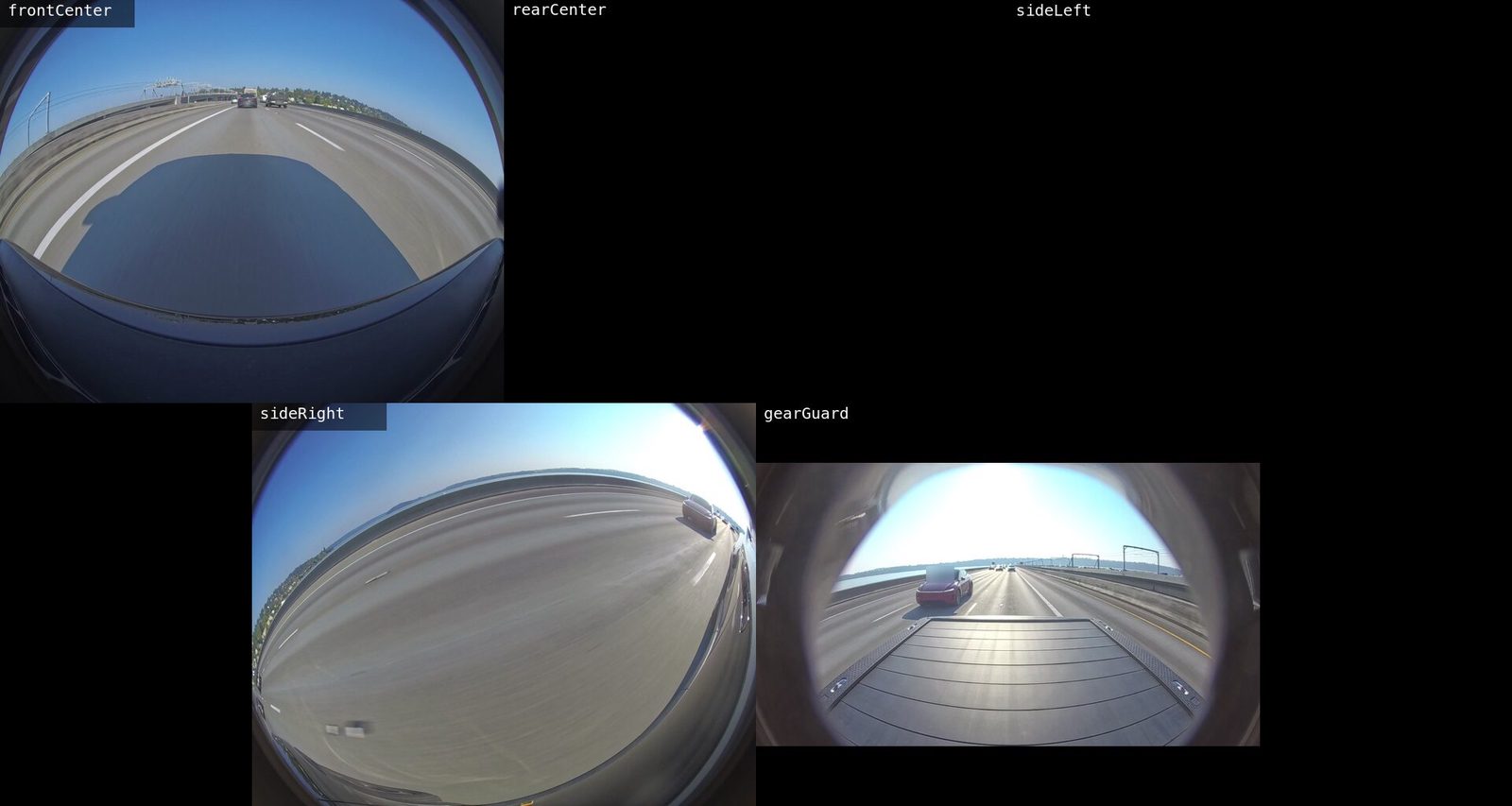
Cause: the camera restarted into a sibling folder
The truck writes one folder per drive, named MM_DD_YY_HHMMSS in local time, and
one file per camera per 15-minute segment inside it. When a camera stops and
restarts partway through a drive, its recording doesn’t continue in the
drive’s folder. A new folder is created a few seconds later, and it holds only
the cameras that restarted. The rest of the drive stays in the original folder.
The two folders together hold the whole drive. Nothing was lost, but the drive is now split across two clocks.
Find the sibling folder
Run this in the DriveStream folder of the truck’s drive, or of your copy of it.
It prints each drive folder with the cameras it holds:
for d in */; do
  printf '%s ' "${d%/}"
  ls "$d" | grep -v '^\._' \
    | sed -E 's/^[0-9_]+_([A-Za-z]+)_[0-9]{3}\.mp4$/\1/' \
    | sort -u | tr '\n' ' '
  echo
done
The grep -v '^\._' drops the AppleDouble files that macOS leaves beside every
clip on the truck’s exFAT drive. The August 7 folders look like this:
08_07_26_100000 frontCenter gearGuard rearCenter sideLeft sideRight
08_07_26_140000 frontCenter gearGuard rearCenter sideLeft sideRight
08_07_26_140034 rearCenter sideLeft
08_07_26_160000 frontCenter gearGuard rearCenter sideLeft sideRight
A sibling folder has all three of these properties:
- Its name is seconds, not minutes, after the previous folder’s name.
- It holds fewer than five cameras.
- Its cameras are the ones that stop early in the previous folder.
A short folder with one camera and no partner is a different case: a stray fragment, not half of a drive. Across 233 drive folders, one was a 21-second fragment from a single camera.
Folder name offset is wrong
The folder names differ by 34 seconds, so the obvious fix is to place the
restarted cameras 34 seconds into the drive. Measured from the footage, the
restarted cameras begin 32.7 seconds into the drive. The names are wrong by more
than a second. The files’ creation_time tags are no better: the two folders'
differ by 35 seconds, a third answer.
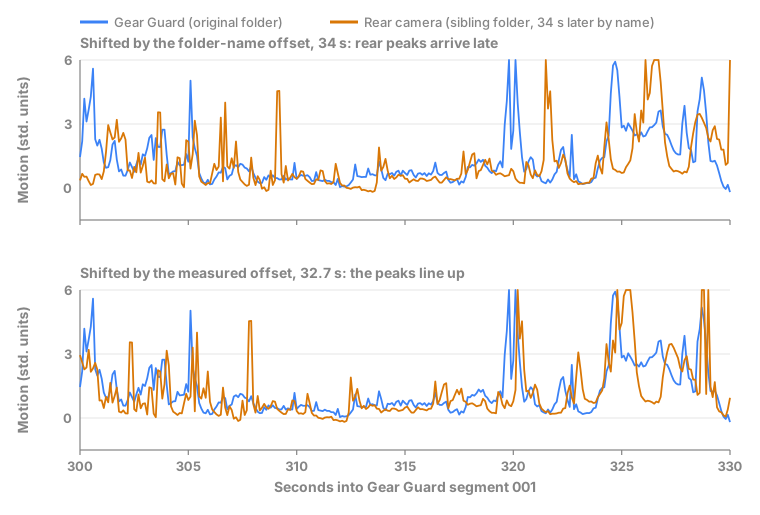
A folder name is a label, not a clock: nothing ties it to the first frame of the video inside. An error of more than a second is visible in a multicam edit. A car that passes the truck crosses the rear view and the side view at moments that no longer match. The truck’s files carry no timecode track to correct it, so the offset has to come from the pictures.
Measure the offset by motion correlation
Two cameras that see the same scene change at the same moments. When the truck hits a bump or a car passes behind it, both backward-facing pictures move at once. The script reduces each camera to a motion signal and slides one signal along the other until they match best:
- Decode a window of each clip at a fixed sample rate, scaled to a tiny grayscale frame.
- Take the mean absolute change between consecutive frames. That’s the motion signal: high when the picture changes, low when it holds still.
- Standardize the reference, and each stretch of the other signal it’s compared with, so that a brighter or busier camera or stretch doesn’t outweigh the rest.
- Try every lag within a search range around your guess, and keep the lag with the highest correlation.
It needs Python 3 and ffmpeg on your path, and nothing else:
"""Measure the time offset between two dashcam clips by correlating their motion.

Usage:
    python3 measure_offset.py REFERENCE OTHER --at SECONDS [--guess SECONDS]

Reads a window of REFERENCE starting at --at, and a slightly wider window of
OTHER around --at minus --guess. Prints the offset that lines the two up:
a moment at time t in REFERENCE is at time t - offset in OTHER.
"""
import argparse
import subprocess

WIDTH, HEIGHT = 32, 24
SAMPLES_PER_SECOND = 10


def motion(clip: str, start: float, seconds: float) -> list[float]:
    """Mean absolute change between consecutive tiny grayscale frames."""
    raw = subprocess.run(
        ["ffmpeg", "-nostdin", "-v", "error",
         "-ss", f"{start:.3f}", "-t", f"{seconds:.3f}", "-i", clip,
         "-vf", f"fps={SAMPLES_PER_SECOND},scale={WIDTH}:{HEIGHT},format=gray",
         "-f", "rawvideo", "-"],
        capture_output=True, check=True,
    ).stdout
    size = WIDTH * HEIGHT
    frames = [raw[i:i + size] for i in range(0, len(raw) - size + 1, size)]
    return [sum(abs(a - b) for a, b in zip(before, after)) / size
            for before, after in zip(frames, frames[1:])]


def standardize(values: list[float]) -> list[float]:
    mean = sum(values) / len(values)
    variance = sum((v - mean) ** 2 for v in values) / len(values)
    spread = variance ** 0.5 or 1.0
    return [(v - mean) / spread for v in values]


def best_lag(reference: list[float], other: list[float]) -> tuple[float, int]:
    """Slide reference along other; return the best correlation and its lag."""
    scores = []
    for lag in range(len(other) - len(reference) + 1):
        window = standardize(other[lag:lag + len(reference)])
        score = sum(a * b for a, b in zip(reference, window)) / len(reference)
        scores.append((score, lag))
    return max(scores)


def main() -> None:
    parser = argparse.ArgumentParser()
    parser.add_argument("reference")
    parser.add_argument("other")
    parser.add_argument("--at", type=float, required=True,
                        help="window start in REFERENCE, seconds")
    parser.add_argument("--guess", type=float, default=0.0,
                        help="expected offset, seconds")
    parser.add_argument("--length", type=float, default=120.0,
                        help="window length, seconds")
    parser.add_argument("--search", type=float, default=5.0,
                        help="how far either side of the guess to look")
    args = parser.parse_args()

    reference = standardize(motion(args.reference, args.at, args.length))
    # The other window starts --search seconds early, so lag 0 means guess + search.
    other_start = args.at - args.guess - args.search
    other_length = args.length + 2 * args.search
    other = motion(args.other, other_start, other_length)

    score, lag = best_lag(reference, other)
    offset = args.guess + args.search - lag / SAMPLES_PER_SECOND
    print(f"window at {args.at:g} s: correlation {score:.2f}, offset {offset:+.1f} s")


if __name__ == "__main__":
    main()
Give it a camera from the original folder as the reference, a camera from the
sibling folder as the other, and the folder-name difference as the guess. Both
folders number their segments from 001 and every segment but the last runs
900 seconds, so segment 002 of the sibling starts the same offset after
segment 002 of the original. Compare files with the same segment number, and
keep the window inside one segment.
In the DriveStream folder, run:
$ python3 measure_offset.py \
    08_07_26_140000/08_07_26_140000_gearGuard_001.mp4 \
    08_07_26_140034/08_07_26_140034_rearCenter_001.mp4 \
    --at 300 --guess 34
Output
window at 300 s: correlation 0.84, offset +32.6 sOne window is one measurement. Repeat it in windows that don’t overlap, from different segments, and trust the offset only when they agree. Four windows on the August 7 drive gave this:
| Segment | --at | Correlation | Offset |
|---|---|---|---|
001 | 300 | 0.84 | +32.6 s |
001 | 700 | 0.73 | +32.7 s |
002 | 600 | 0.85 | +32.8 s |
003 | 200 | 0.69 | +32.7 s |
That’s 32.7 seconds, plus or minus 0.1, from four independent windows. A moment at time t in the original folder is at t − 32.7 in the sibling folder.
Compare cameras that face the same way
The front camera was my first choice for the reference, because it recorded the whole drive. Against the restarted rear camera it gave two answers:
| Segment | --at | Correlation | Offset |
|---|---|---|---|
001 | 300 | 0.74 | +31.9 s |
002 | 600 | 0.52 | +32.8 s |
The two windows disagree by 0.9 seconds, and each one looks plausible on its own. The front camera sees the road ahead and the rear camera sees the road behind. Their pictures change for different reasons most of the time, so the best match moves from one window to the next. The Gear Guard camera looks backward over the bed, the same direction as the rear camera, and the two agree.
Pick a reference camera that kept recording in the original folder and faces the same direction as one of the restarted cameras. The files in a sibling folder share one start time and the same segment lengths, so the offset you measure for one of its cameras applies to all of them.
Stitch the restarted cameras
A stream copy can only start on a keyframe, and the truck writes one keyframe per second. The stream-copied angles from the original folder start on their own keyframes. An offset of 32.7 seconds isn’t a whole number of seconds, so no keyframe in the sibling folder falls on the same instant. Re-encode only the restarted cameras, cut at the exact frame, and leave the rest as stream copies.
Suppose your clip covers START to END seconds of the original folder, and
OFFSET is the measured offset. The window has to begin after the restart, so
START is greater than OFFSET. In the sibling folder, the clip begins at
START minus OFFSET and lasts END minus START seconds.
In the DriveStream folder, the following commands write a concat list of the
restarted camera’s segments in the sibling folder, and then cut the clip from
the joined segments, re-encoding to HEVC. They create two files and change
nothing in the drive folders:
printf "file '%s'\n" "$PWD"/08_07_26_140034/08_07_26_140034_rearCenter_*.mp4 \
  > rearCenter.txt
ffmpeg -f concat -safe 0 -i rearCenter.txt -ss <sibling-start> -t <duration> \
  -c:v hevc_videotoolbox -q:v 80 -tag:v hvc1 -color_range pc -an \
  <clip-folder>/rearCenter.mp4
Run the same two commands for every other camera in the sibling folder.
-ss after -i decodes from the start of the list and discards frames up to
the exact time, so the output starts on that instant rather than on the nearest
keyframe. It’s slow for a window late in the drive, because ffmpeg decodes
everything before the window first. Joining the segments in one concat pass,
rather than cutting each file and joining the cuts, keeps the frames whose
group of pictures runs across a segment boundary. Cut multi-camera dashcam
clips with ffmpeg covers the
stream-copied cameras and that join in full.
The encoder hevc_videotoolbox is the hardware HEVC encoder on macOS. On
another system, use the encoder you’d use for the rest of the project. The
option -color_range pc labels the re-encoded angle full range like the
truck’s footage, so it matches the stream-copied ones; check it with
ffprobe -show_entries stream=color_range. The truck
records no audio, so -an drops nothing.
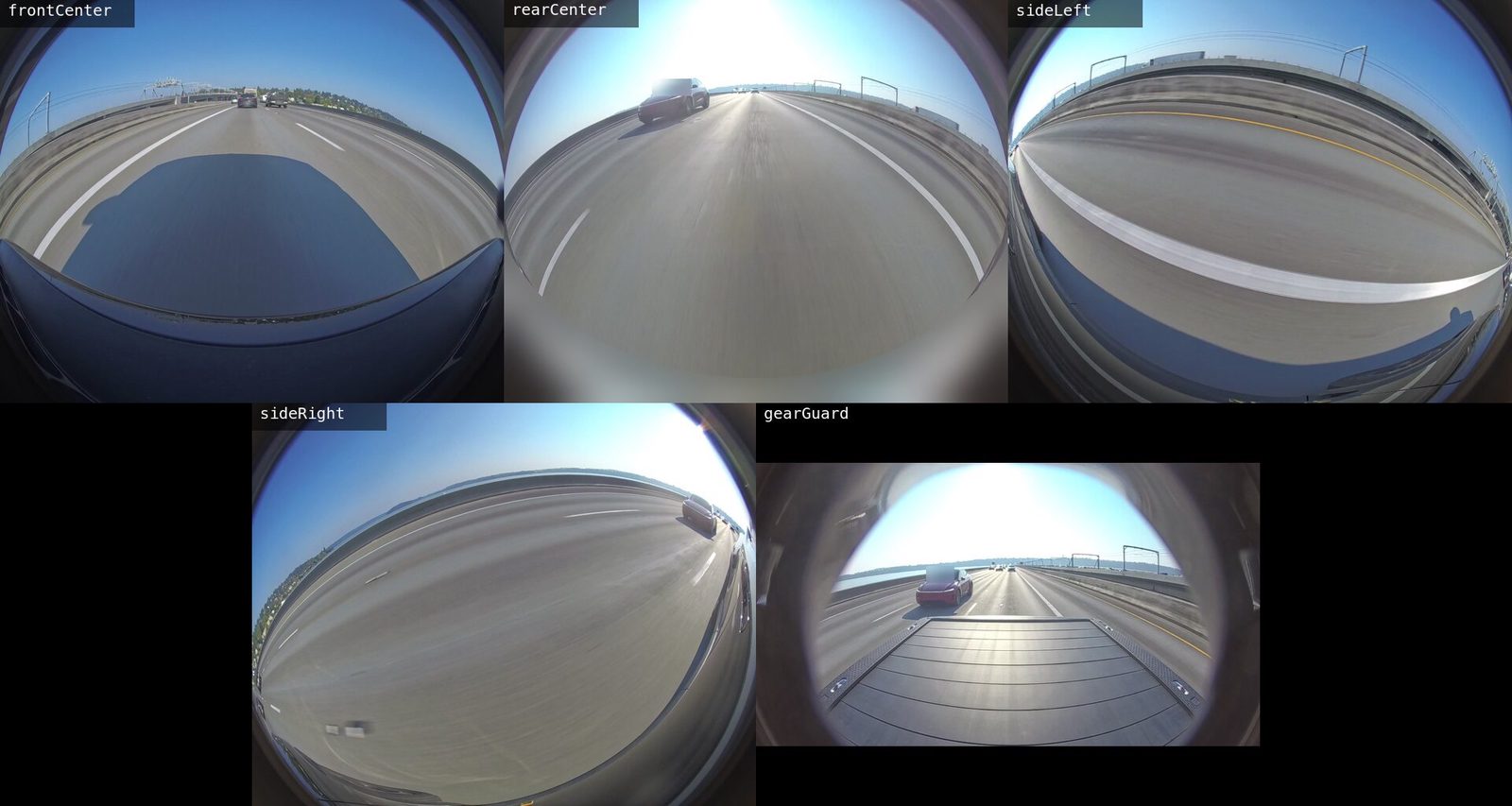
Every file now starts at time 0. The re-encoded angles start on the exact frame, and a stream-copied one starts early by the lead the cut script printed for it. In DaVinci Resolve, mark each lead as an In point, then create the multicam clip with angle sync set to the In point.
Confirm the stitch
Run the same script on the finished clip, with the guess left at zero. In the clip’s folder, compare the Gear Guard camera, which was stream-copied from the original folder, with the re-encoded rear camera:
$ python3 measure_offset.py 08_07_26_140000_gearGuard.mp4 \
    08_07_26_140000_rearCenter.mp4 --at 300 --length 90
Output
window at 300 s: correlation 0.79, offset +0.1 sAn offset of +0.1 seconds is one sample step of SAMPLES_PER_SECOND, the
resolution of the method. The angles are in sync. The same script reported
32.7 seconds on the unstitched folders, so it does notice an offset when one
exists. A zero from a check that has never reported anything else proves
nothing.